The call is a first conversation about which solution fits you.
One plain sentence on what each does. References are coming soon.
Index · 12 tools · 01 place keptBuilt by us
01
The factory
The factory · writes training documents
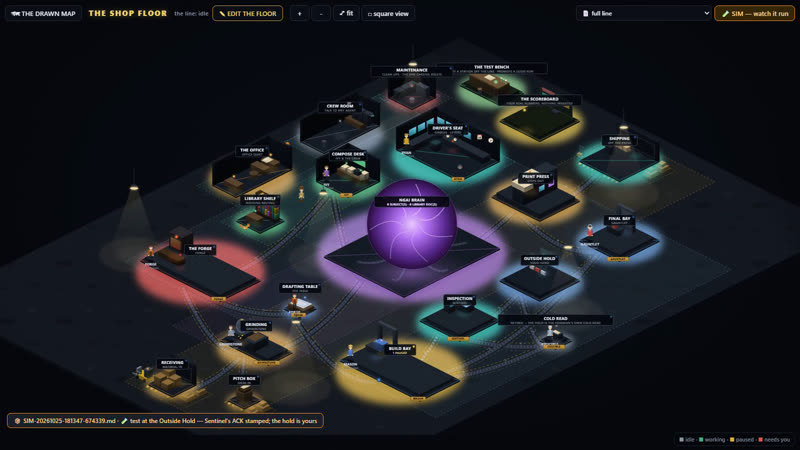
A model builder for companies that work with AI agents. The factory is a model builder. You lay out the floor, add stations, give each one a worker and a model, and draw the belts between them. You see the whole company, working, as a picture. Someone who has never used AI can do it with clicks, and enjoy it. Our own line writes training documents this way: one agent drafts, a second checks, a person reviews, a final audit runs, and nothing goes out without a person's yes. You can also sketch your own process on the floor with us, and we turn it into a working line. The film shows it running.
01 DraftFrom a fixed brief
02 CheckA second agent
03 PersonReviews it
04 AuditA final check
05 PublishWaits for a yes
Watch it run
Play · 0:36The factory's own test job riding the full line: Forge, Mason, Sentinel, the Outside Hold, the Final Bay. Demo job; nothing spent.
(If you spot the cat chasing the mouse, it's real. We add small details just for fun.)
Text version
The factory's own test job riding the full line: Forge, Mason, Sentinel, the Outside Hold, the Final Bay. Demo job; nothing spent.
02
WhatsApp to calendar
A demo · chat to booking
A lead writes on WhatsApp; the system captures the details, drafts a reply for approval and books the appointment. Why you'd want it: a customer who writes at night gets an answer, and the appointment lands in the calendar without anyone retyping it. A person still approves the reply. Where people text instead of using WhatsApp, the same solution runs over ordinary text messages (SMS).Three ways to have it: free, hosted by us or running on your own server. What each one covers and costs is agreed on the call.
Daily office work: figures copied by hand between spreadsheets, shared files and the accounting system, again and again. An agent cleans the files up, and a person approves every change.Why you'd want it: the same figures stop being typed twice, and a person decides what goes into the system. An example of the kind of daily office work we automate. Not a client.
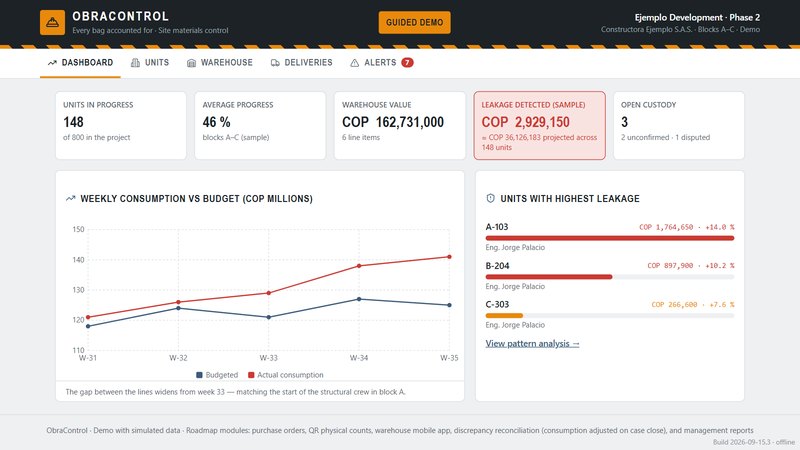
Every bag counted, from the warehouse to the unit. ObraControl compares the material each unit uses with its budget, week by week, and follows every delivery until the engineer on site confirms it or reports a shortage. Why you'd want it: material used beyond budget, low stock and short deliveries show up while there is still time to act, and a person decides what to do about each alert. The same idea can be fitted to other businesses.
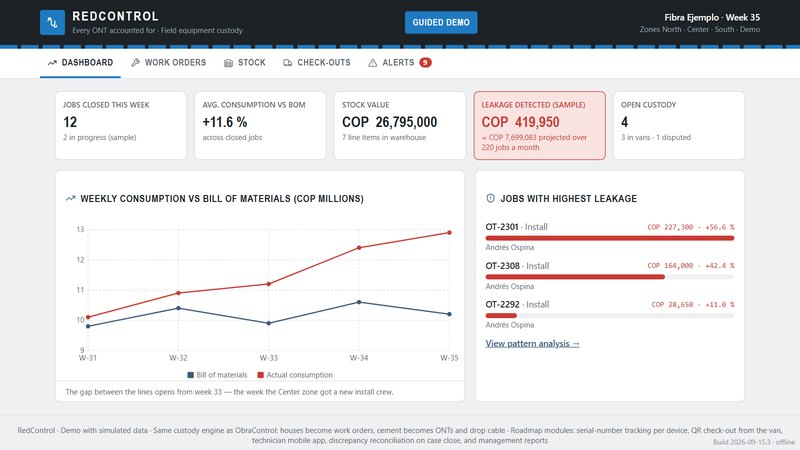
Every modem accounted for, from the warehouse to the van to the home. RedControl is the same idea as ObraControl, fitted to an internet provider: every modem, router and meter of cable checked out to a technician stays in their custody until it is checked back in, and each install or repair is compared with its list of materials. Why you'd want it: you see what is in each van right now and which jobs used more than they should; when the overruns share one technician, the alerts point it out, and a person decides what to do.
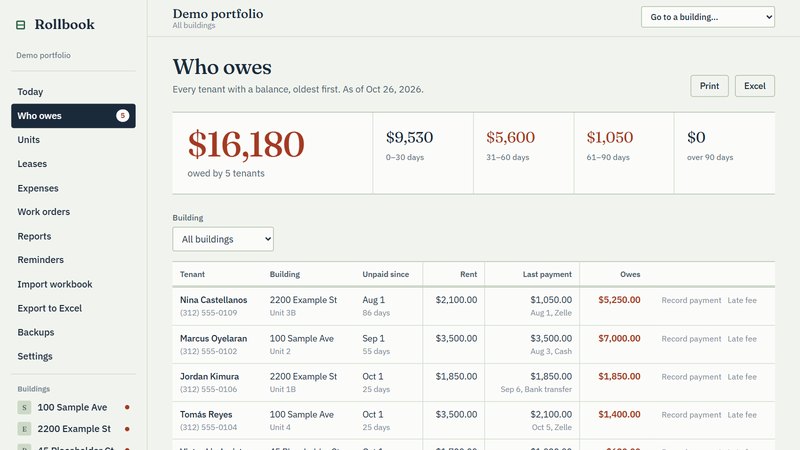
A rent roll and ledger for a landlord who runs their own small buildings. The Who owes screen lists every tenant with a balance, oldest first, by how many days late, and the Units board colors every unit as paid, partial, owes or vacant. It also keeps a ledger per unit, leases, expenses, work orders that post their cost to expenses and yearly reports, and it reads and writes Excel workbooks. Why you'd want it: who has paid, who is late and what each building spent are on one screen instead of in a stack of spreadsheets, and a late fee is added only when a person clicks it.
Demo data; names are fictional
07
AI guy
An AI worker
Why you'd want it: an AI that works for you needs a sandbox. AI guy lives in its own sealed-off computer, away from yours, with its own key and its own chat line, so it has no way into your own computer or your files, only into what you give it. It starts switched off and has a stop switch.
The personal assistant that replaces the apps you stopped using. If you keep a to-do list, an expense tracker or a reminders app, NORM replaces all of them with a voice note or a tap on yes or no. Tell it what happened, out loud. It keeps the list, the deadlines, the papers and the money number, and sends one short brief every morning. Nothing about your money changes without your yes. NORM can do much more: for example, it can control software on a computer remotely. For companies that want that level, we build custom packages.
The owner sends photos in a chat. Nicky crops them, writes three caption options and suggests a time to post. Why you'd want it: you take the photos; Nicky does the writing and the timing. Nothing is posted until you tap approve.
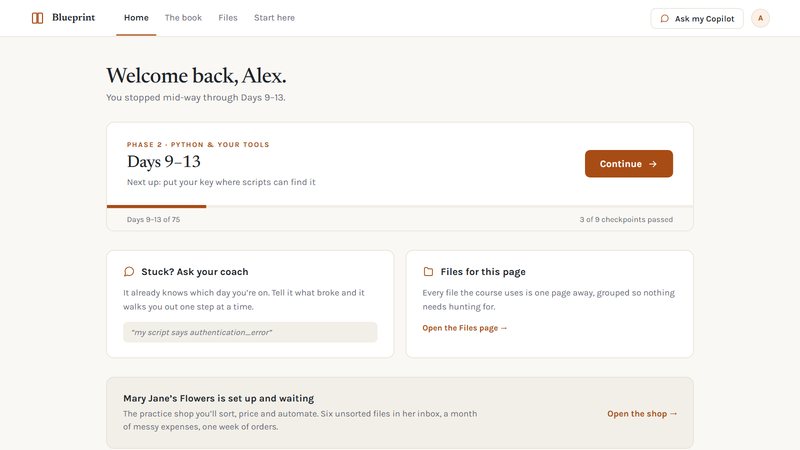
A self-paced course, read on its own site, in plain words: the Normal Guy AI way. An AI coach gives the reader one next step at a time, so they finish. Why you'd want it: your people learn AI at their own pace, on their own work, so it becomes a habit and not a one-off.
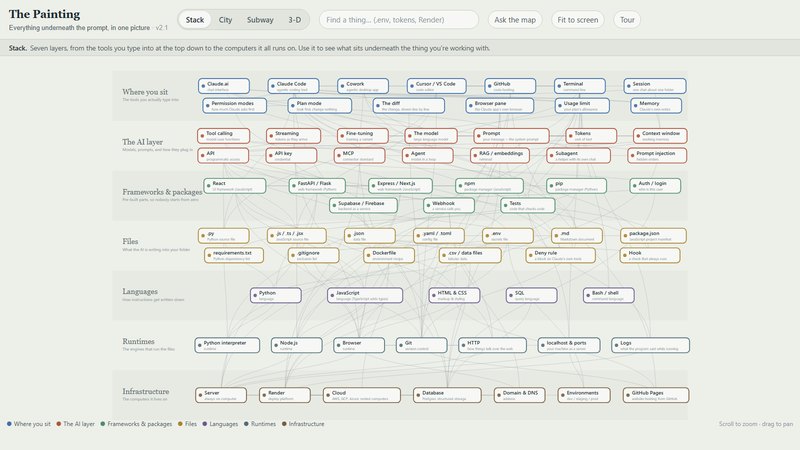
The prompt, the words you type, is only the tip. Seven layers of work sit under it, and the picture shows all seven, from the tools you type into down to the computers it all runs on. Open the interactive map and click any piece to see what it is, in plain words. Why you'd want it: nobody has time to learn every part. This shows how the pieces fit together, so you know what is happening under your prompt.